

You already know the drill. The leak shows up after midnight, the tenant is frustrated, the plumber can't get in until morning, and you're the one who has to untangle it all. That's the primary reason smart home integration has moved from a nice-to-have to an operating tool for landlords who are tired of paying for preventable chaos.
The market has clearly crossed into mainstream territory. Omdia estimated the global smart home market at $60.8 billion in 2020 and projected it would exceed $178.5 billion in 2025, with 19% of broadband households globally already using a smart home device in 2020, up from 10% in 2017 (Omdia market summary). In the U.S., Parks Associates estimated about 13 million new internet-connected households entered the market since 2020, bringing the total to 54 million homes with smart devices (Parks Associates estimate). That doesn't mean every rental needs every gadget. It does mean tenants now expect a property to feel current, responsive, and easier to live in than the last one they toured.
Why Landlords Are Rethinking Rental Property Technology
The smartest landlords I know did not start with a grand tech plan. They started with a headache. A water alarm went off, the unit sat empty while someone hunted for a code, or a maintenance call turned into a damage claim because nobody had visibility until the problem was already expensive. That is when the old way starts looking slow and careless.
Tenant expectations have shifted too. People who grew up with connected devices do not see a smart thermostat or a video doorbell as a luxury perk. They see it as basic functionality, the same way they see online rent payment and digital lease signing as normal.
The business case is operational, not decorative
A good installation reduces friction in the parts of property management that eat time. That includes access coordination, recurring service visits, complaint handling, and dispute prevention. It also gives you cleaner documentation when something goes wrong, which matters more than marketing copy ever will.
Practical rule: If a device does not save time, reduce risk, or make turnover smoother, skip it.
For landlords, the test is whether the property runs with fewer manual steps and fewer after-hours interruptions. Better access control keeps vendors from waiting at the door. Better monitoring shortens the gap between a small problem and a costly repair. Better records also make tenant turnover easier because you can show what happened, when it happened, and who had access.
California owners need to think about privacy and tenant notice from the start. A smart lock is one thing. A camera pointed at the wrong place, or a device that collects more data than you can justify, creates compliance problems fast. I have seen landlords spend more fixing a bad rollout than they would have spent on a cleaner setup, and the same logic applies when comparing smart home automation for homeowners with a rental property deployment.
The market has already moved in this direction. With the U.S. already at 54 million homes using smart devices and 13 million more households added since 2020 (Parks Associates estimate), many renters now expect a property to feel current and easier to live in than the last place they toured. You do not need to chase every trend. You do need to stop losing showings to better-equipped properties.
For landlords, the question is not whether smart home integration is trendy. It is whether the property performs better with fewer manual tasks, fewer disputes, and fewer service calls that drag your team into avoidable messes. If the answer is yes, you are buying control, not gadgets.
Understanding Smart Home Integration as a System
A lot of landlords make the same mistake. They buy a smart lock here, a thermostat there, maybe a camera by the front door, and then wonder why the property still feels pieced together. That is not smart home integration. It is a pile of devices with an app problem.
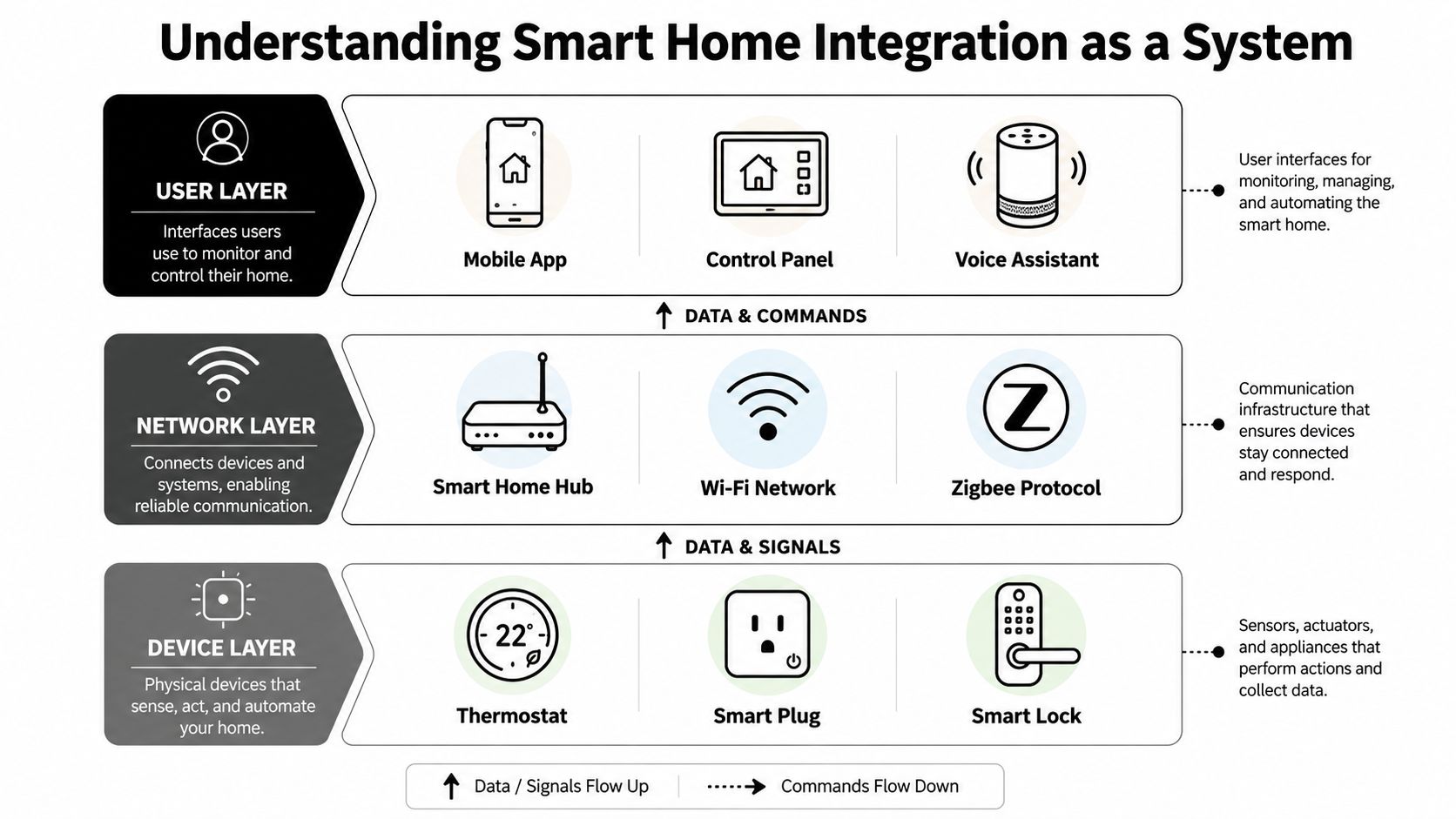
A rental property with smart home integration works more like a nervous system than a stack of gadgets. The devices are the endpoints, the gateway carries the signal, and the control app is what lets you read what is happening and respond without chasing three different interfaces. If one layer is out of sync, the whole setup becomes clumsy fast.
The standards matter because they decide whether you are building a stable system or a future headache. ETSI TS 103 424 defines a Home Gateway architecture where the Device Abstraction Layer can add new Home Area Network technologies without changing the common API at RP1, while RP4 handles remote command-and-control and RP1 must support device discovery, topology discovery, and connectivity testing (ETSI TS 103 424). In plain English, that means you can add new devices behind a stable interface instead of rebuilding the whole property every time you switch brands.
Start with compatibility, not features
The gateway is where mixed-device properties either hold together or fall apart. ITU-T J.1611 recommends gateway support for Ethernet or Wi‑Fi, Bluetooth LE 4.2+, Zigbee 3.0+, and optionally sub-1G modules for low-frequency IoT links (ITU-T J.1611). That matters because broader radio support means fewer separate hubs, fewer support calls, and less tenant confusion when something stops responding.
If you want a practical consumer-side reference for how people think about connected homes, DLG Electrical's overview of smart home automation for homeowners is a useful reminder that the best systems feel invisible when they are done right. That is the standard landlords should aim for.
Keep the system simple enough to maintain
Here is the part many owners miss. Integration is not just about adding devices. It is about making sure the property can be reset, serviced, and handed off cleanly when a tenant leaves. If a device cannot be discovered, controlled, or reassigned without drama, it is a bad fit for rental use.
Choose one primary ecosystem for the property, then stick to it unless there is a clear operational reason not to. Fragmentation is expensive. Stability pays.
Measurable Benefits for Rental Property Operations
The best case for smart home integration is simple, the building becomes easier to run with less hands-on babysitting. That matters to landlords because the job is about keeping units occupied, limiting preventable damage, and resolving problems before they turn into claims or conflict.
What pays off first
Some devices are operational tools, not gadgets. A smart thermostat can settle utility disputes because the settings are visible instead of guessed at. A video doorbell can document package delivery issues and visitor timing. Water sensors are even more direct. They catch a leak before it turns into drywall, flooring, and a vacancy headache.
Landlord standard: Install the device that tells you about the problem before the tenant opens a ticket.
That rule matters because the value is in the workflow, not the brochure. In rental housing, the right device is the one that reduces surprise calls, shortens repair coordination, and gives you a record when there is a dispute. If a product does not help with those three things, it is probably decorative.
The return is uneven, so prioritize hard
Treating every smart device as if it delivers the same return is a mistake. Access control and leak detection solve expensive problems. Color-changing lights and novelty scenes do not. If the property is older, has plumbing risk on more than one level, or sees frequent turnover, prevention and handoff deserve priority over novelty.
Security features also cut down on friction after an incident. A documented access trail is more useful than a vague memory of who came and went. That helps when you are sorting out a package theft complaint, a vendor visit, or a tenant claim about unauthorized entry. It also creates cleaner conversations with maintenance vendors, because you can verify whether the issue was a device failure, a user mistake, or a scheduling miss.
For California owners, the operational benefit has to sit inside landlord-tenant law and privacy rules. If a device can expose occupancy patterns, grant access, or collect recordings in the wrong place, the cost of a bad setup will outweigh the convenience fast.
Rent premium is real only when the system feels coherent
A single smart device rarely changes the market. A property that feels modern, secure, and easier to live in can. The difference is consistency. A mismatched setup signals cheap upgrades. A coherent setup signals management that pays attention.
That coherence also matters for turnover. When a tenant moves out, you want a system that can be reset, reassigned, and checked without a service call circus. If your team has to chase five apps, four logins, and a half-documented install every time a unit turns over, the technology is costing you labor instead of saving it. Standardize the setup, keep the handoff process simple, and avoid devices that need constant explainers.
For network-side screening before a property-wide rollout, the Premier Broadband security tips are worth reviewing. The network is part of the operating risk, and weak defaults create unnecessary support calls.
California Privacy Laws and Tenant Rights Compliance
California is where smart home optimism runs straight into tenant-rights reality. If you install devices like you're outfitting a personal residence, you're asking for trouble. Landlords need a tighter rule set, because the wrong camera angle, access log, or lease clause can turn a useful upgrade into a privacy complaint.
The cleanest way to think about it is simple. A landlord can manage property, but not a tenant's private life. That distinction has to show up in device placement, notice, access control, and the lease language. If it doesn't, the technology becomes evidence against you.
Watch the device type, not just the brand
Smart locks need strict controls over master codes, temporary access, and who can see the log. Security cameras belong in common areas, not private spaces. Voice-activated devices are especially risky if they create recordings or trigger misunderstandings about consent. Those are not edge cases. They're the places where routine operations create privacy exposure.
Compliance rule: If a device can record, track, or reveal occupancy patterns, treat it like a regulated access point, not a convenience feature.
For a practical security lens on the network side, Premier Broadband's security tips for home networks are worth reviewing before you let any property-wide system go live. The network is part of the compliance story, because weak access control turns device management into a liability problem.
Put the rules in the lease and the turnover checklist
Your lease should say who owns the device, who maintains it, who can access it, and what happens when the tenancy ends. It should also say what happens if the device fails. Don't leave that to phone calls after move-out.
The California landlord-tenant framework deserves to be reviewed alongside the technology plan, and the state-specific baseline is detailed in this California landlord-tenant law resource. Use that as the legal anchor, then draft your smart-device language around access, notice, repair coordination, and reset procedures.
The gray area most landlords ask about is occupancy verification. My advice is blunt, do not use smart home data as a surveillance substitute for proper notice and proper documentation. If the device is there for climate control, security, or maintenance coordination, keep its use narrowly tied to that purpose. During turnover, reset every access credential and document the handoff in writing. That's how you avoid disputes later.
DIY Installation Versus Professional Services
A landlord who saves money on the install but creates repeat maintenance calls has not saved anything. Smart home work should reduce turnover friction, not add another weekend project to your calendar.
Know what's actually DIY
Smart plugs and basic wireless sensors are usually fair DIY jobs. They are simple enough for an owner who wants to test a system without tying up a contractor. Smart thermostats and doorbell cameras sit in a different category. A capable landlord can install them, but they bring wiring checks, network setup, and a much higher chance of a callback.
Hardwired security systems and multi-unit smart lock deployments belong with a professional installer. If the mistake affects several units or a shared entry, the repair bill is only part of the problem. Lost access, delayed turnover, and tenant complaints cost more than the install fee you tried to avoid.
This is also where contractor management matters. If you are coordinating several vendors, compare the install against your maintenance workflow before you start handing out tools. A clean vendor process keeps you from turning one device upgrade into a string of follow-up visits.
Use the market as a sanity check
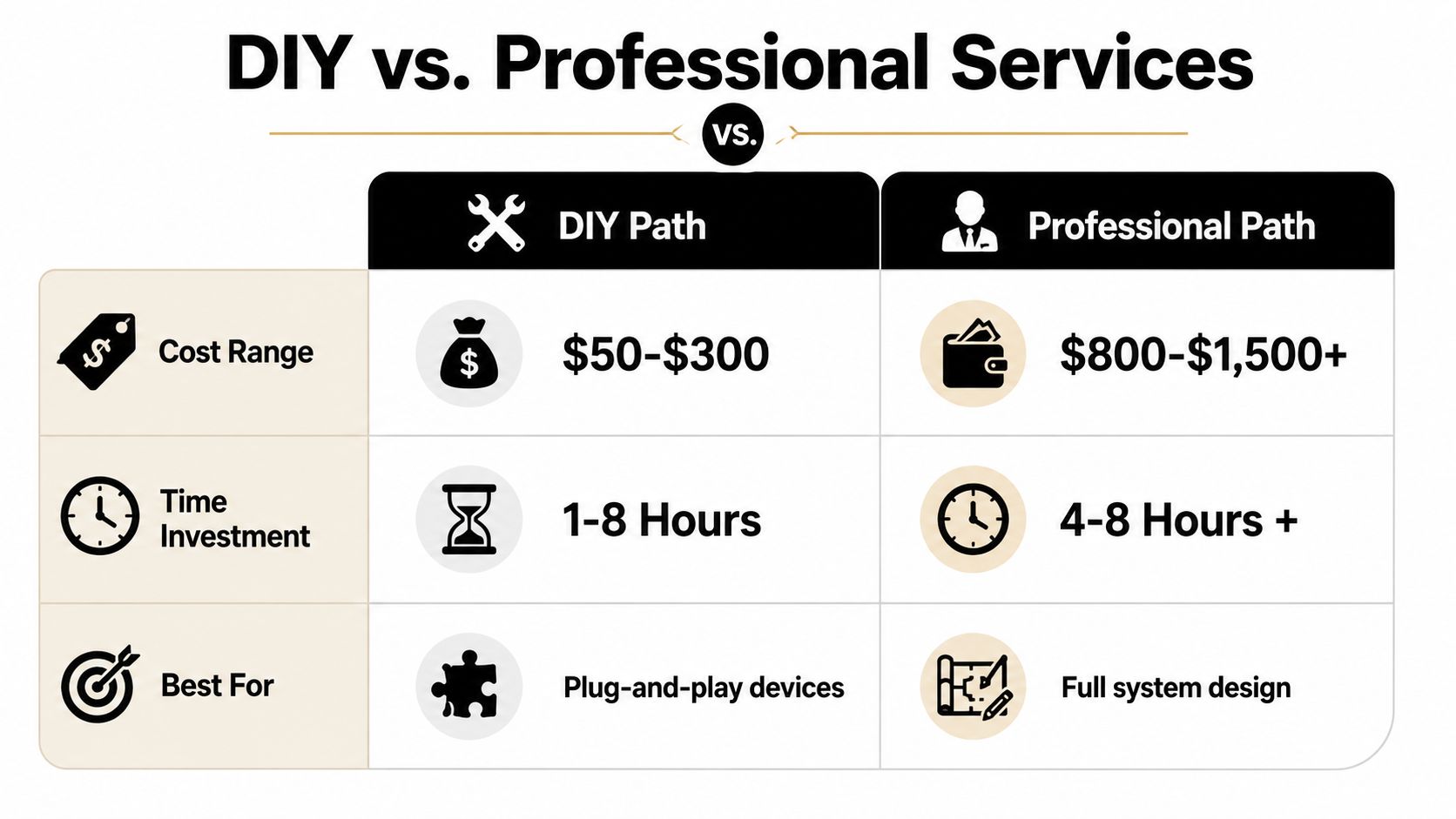
For planning purposes, the comparison in this A comparison chart showing the cost, time, and suitability of DIY versus professional smart home installation services. shows DIY at about $50-$300 and Professional Path at about $800-$1,500+, with DIY usually taking 1-8 Hours and professional work taking 4-8 Hours + depending on scope and system design. Use that as a budgeting frame, not a promise. It keeps owners from pretending labor is free.
If you want a pricing reference for thermostat work, Tucson thermostat installation pricing is a useful benchmark for how professional labor is priced. It also makes one point clear, the device cost is only part of the spend.
Decide by property type, not ego
Single-family rentals can handle more DIY if the landlord is comfortable with the technology and willing to support it. Multi-unit properties need stricter standardization and fewer custom fixes. If you are managing several doors, one reliable installer can save more than the hourly rate suggests, especially when schedules are tight and turnovers stack up.
If you want a quick rule, use this one. Choose DIY only when the work is low risk, the device is easy to reset, and the property can tolerate a mistake. Hire the pro when the install touches shared systems, affects multiple tenants, or creates more operational calls than it removes.
Step-by-Step Implementation Roadmap for Landlords
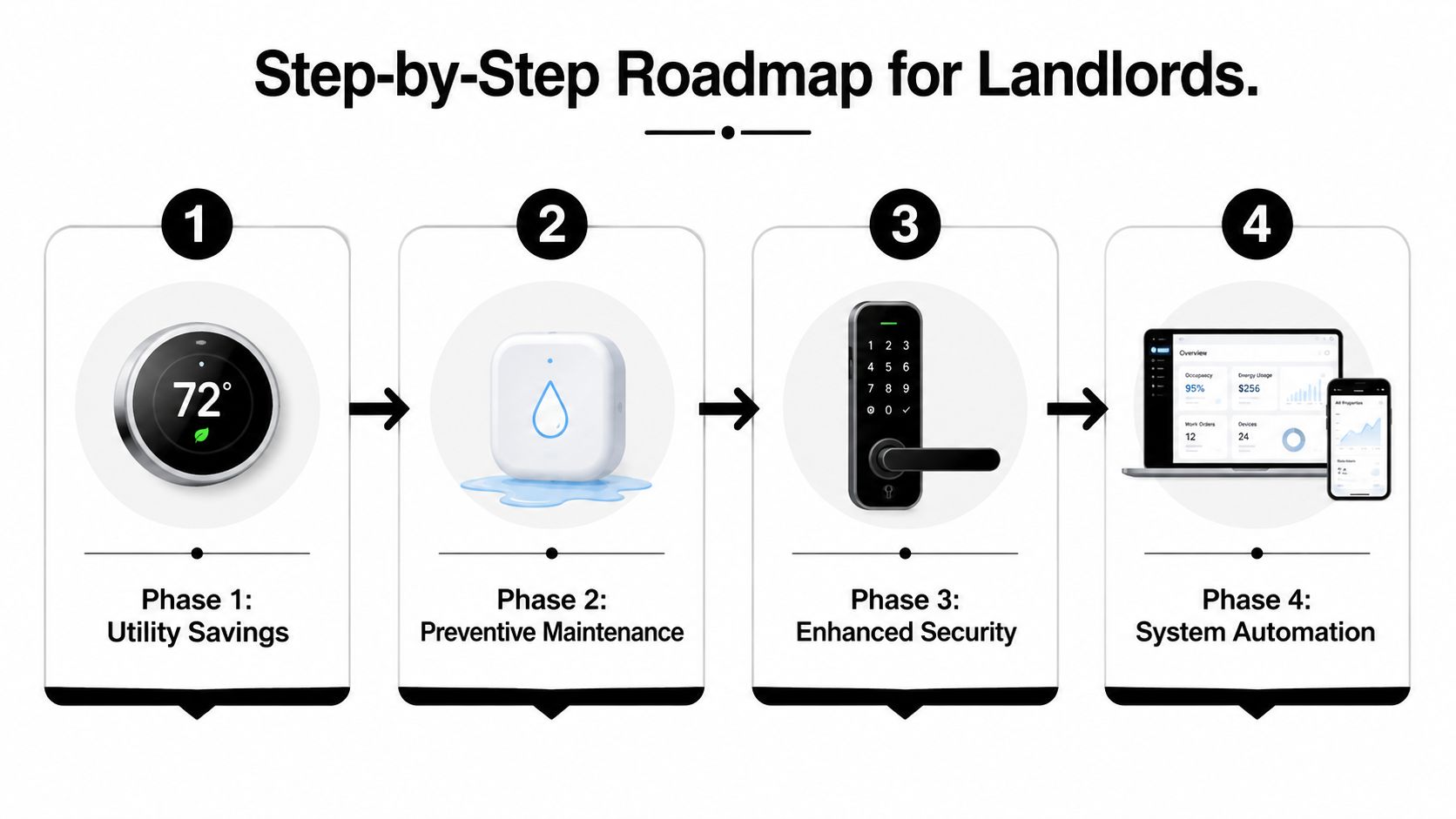
The fastest way to waste money is to try to automate everything at once. The cleaner approach is phased deployment, starting with devices that solve obvious landlord problems first. That keeps risk low and lets you prove value before you expand.
Phase 1 utility and entry visibility
Start with smart thermostats and video doorbells. For ecosystems, Google Nest fits best if the property will lean into Google Home, Amazon Alexa works fine for broad compatibility, and Apple Home is strongest when the tenant base is already heavily Apple-oriented. The point isn't loyalty. It's consistency.
A thermostat should be treated as a control point for cost and comfort. A doorbell camera should be treated as documentation for entry events and package delivery. Keep the first phase small enough that you can support it.
Phase 2 maintenance alerts
Add water leak detectors next, then expand into HVAC-related sensors where the equipment justifies it. This is the phase that prevents expensive surprises. A leak sensor under a sink or near a water heater is boring until it isn't.
The landlord's job here is not to collect data for its own sake. It's to shorten the time between failure and response. If a sensor doesn't help you react faster, it doesn't belong in the unit.
Phase 3 access control
Smart locks come after you've proven the network and the app process work. Use temporary codes for maintenance visits and turnover windows, then revoke them immediately after the task is done. That's cleaner than juggling keys and safer than leaving old access in circulation.
Before you buy anything
Check three things first.
- Wi-Fi coverage: Weak coverage turns every smart device into a support ticket.
- Electrical readiness: Older properties need a wiring check before you buy anything hardwired.
- Tenant communication: Tell tenants what's being installed, what it does, and what it does not do.
For landlords who want a broader ecosystem reference, Google's newer Home AI features keep pushing the category toward natural-language control, but the main takeaway is simpler, the system only works if the devices are correctly integrated and supported. Fancy software won't fix poor prep.
Ongoing Management and Long-Term Maintenance Strategy
A smart system starts creating work the moment it goes live. Batteries die, credentials change, tenants move, routers get swapped, and someone eventually forgets which app controls the thermostat. If you do not plan for that operating load, smart home integration turns into another maintenance headache instead of a cleaner way to run the property.
Treat devices like assets, not accessories
Build a device inventory for every unit. Log the model name, admin access, tenant permissions, battery replacement dates, and reset steps. Put that record inside your regular property maintenance calendar so your team can tell, at a glance, who controls what and which device needs attention next.
That record should also note the failure points. Wireless devices break differently from hardwired ones. Batteries run down, firmware changes, and connectivity slips after router swaps or app updates. If one person is not assigned to watch those items, you will usually find out during a move-out or a weekend repair, when the cost is higher and the tenant is already frustrated.
The software side should sit inside your broader workflow. A platform like property maintenance management software works only if it helps you track tasks, vendor access, and device follow-ups in the same place you already manage work orders. Separate systems create duplicate work, missed handoffs, and weak recordkeeping.
Build turnover into the process
Tenant onboarding needs a short device handoff sheet. Keep it practical. Show what is installed, what the tenant can control, who to call for support, and what happens if they change router settings. During move-out, reset access codes, remove user accounts, and confirm the property is no longer tied to the departing tenant's phone or email.
Maintenance habit: Every turnover should end with a full credential reset, not a partial one.
That rule protects you from avoidable access problems. It also keeps maintenance simple when the next tenant moves in, because the system starts clean instead of carrying old permissions forward.
Upgrade only when the old system is costing you
Do not replace devices because the packaging looks better. Replace them when support gets bad, when integration breaks, or when the current setup creates repeat service calls. That is the ROI test. New technology earns its keep only when it cuts friction more than it adds it.
The long-term advantage of smart home integration is standardization. A property with clean device records, clear permissions, and disciplined reset procedures is easier to operate, easier to hand off, and less likely to surprise you when something fails. That is the part landlords feel in day-to-day operations, fewer interruptions, faster turnover, and cleaner control over access and maintenance.


