

You're usually not searching for home networking services near me because you're curious about routers. You're searching because something in the house or rental isn't working the way it should. Video calls freeze in the back bedroom. The smart TV buffers at night. A tenant says the Wi-Fi is “fine” until you need to remote in and diagnose a camera, lock, or thermostat issue.
Property owners run into a second problem that most tech articles ignore. A home network isn't just a gadget setup. It affects leasing, turnovers, smart home reliability, contractor coordination, and sometimes tenant access rights. If you own rentals, a bad install can create repeat service calls. A good one can become a marketable amenity.
The trick is to approach networking like any other property system. Define the problem, hire the right trade, document the work, and make sure the setup still serves the property two years from now.
How to Assess Your Home Network Needs
Before you call anyone, walk the property and audit the network the same way you'd inspect plumbing or HVAC. If you can describe the problem clearly, you'll get better quotes and better solutions.
A lot of homeowners start with speed. That's rarely the full issue. Coverage, device density, wall construction, equipment placement, and poor cabling cause just as many complaints. The average household now has over 20 connected devices according to this home networking device market overview. In a rental or smart home setup, that can include phones, laptops, TVs, doorbells, thermostats, plugs, cameras, and smart speakers before you even count guests.
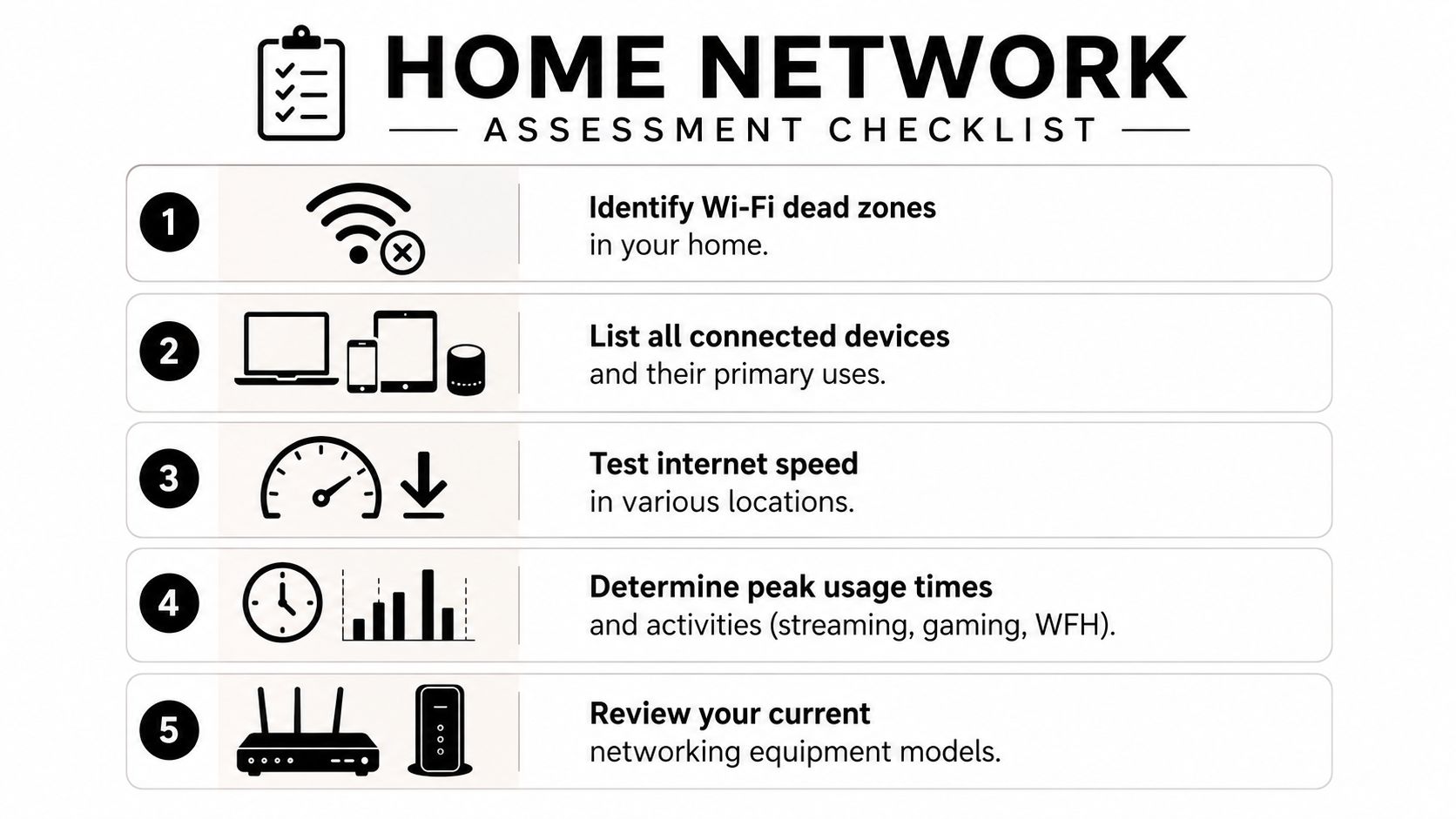
Map the house before you map the signal
Start with a simple floor plan. It doesn't need software. A printed real estate flyer or hand sketch works fine.
Mark these points:
- Router location: Where the modem and router sit now.
- Dead zones: Any room, patio, garage, or upstairs area where service drops.
- High-demand spaces: Home office, media room, primary bedroom, living room, and any detached workspace.
- Smart device clusters: Doorbell, cameras, thermostat hub, garage controller, irrigation controller, and alarm panel.
This gives you a working picture of where the network matters. In my experience, owners often focus on bedrooms and forget the living room, kitchen, garage, or exterior camera locations. Those omissions become service calls later.
Practical rule: If a room houses a TV, desk, camera hub, gaming setup, or work station, treat it as a priority location even if the current user says Wi-Fi is “good enough.”
Inventory devices and actual use
Don't just count devices. Categorize them by what they demand from the network.
A useful audit looks like this:
| Device type | Examples | What matters most |
|---|---|---|
| Work devices | Laptops, docking stations, VoIP phones | Stability, low interruption |
| Entertainment | Smart TVs, streaming boxes, game consoles | Consistent throughput |
| Smart home | Cameras, thermostats, hubs, locks | Reliability, placement, coverage |
| Mobile | Phones, tablets | Roaming between rooms |
| Property systems | Security panels, smart locks, intercoms | Always-on connectivity |
Then define the top three activities the network must support. For most households and rentals, that's usually some mix of work-from-home calls, streaming, gaming, and smart home operation. If you don't rank priorities, every contractor will pitch a different solution and every quote will look “reasonable.”
Check conditions, not just complaints
Do a room-by-room walkthrough at the times the network struggles most. Test from the office, bedroom, patio, garage, and any detached area. Note whether the issue is slow loading, dropped connection, or complete dead zone. Those are different problems.
Also record what equipment you already have. Write down the modem model, router brand, any mesh units, extenders, or switches. A provider can't judge whether your setup is salvageable if you only tell them the Wi-Fi “comes from Spectrum” or “uses Google.”
By the end of this audit, you should be able to say something specific, like: the back two bedrooms lose signal, the living room TV buffers during evening use, and the camera at the garage disconnects. That's a serviceable problem statement. It's much better than asking someone to “fix the internet.”
Understanding Different Home Networking Services
Once you start searching for local help, you'll notice that very different trades all claim to handle home networks. That's where many owners make the first expensive mistake. They hire a person who's good at one layer of the job and expect them to solve all of it.

Who does what
Here's the practical breakdown I use when screening vendors:
| Professional type | Best for | Usually not best for |
|---|---|---|
| Low-voltage installer | Running Ethernet, wall jacks, patch panels, structured wiring | Deep Wi-Fi tuning or network security design |
| A/V installer | Whole-home setups, media rooms, access points, smart home integration | Complex IT troubleshooting |
| IT consultant or network specialist | Wi-Fi optimization, router setup, segmentation, troubleshooting | Physical cable runs through difficult walls |
A low-voltage installer is the right call when the property needs new cable in walls, clean terminations, and a wiring closet that won't turn into a mess at the next turnover. An A/V installer often shines when the project includes TVs, speakers, smart home hubs, cameras, and whole-home Wi-Fi. An IT consultant is useful when the house is already wired but the network performs poorly, devices conflict, or security settings need work.
What tends to work in real houses
For whole-home coverage, professionally installed access points hardwired with Cat6 perform better than a random extender added after the fact. According to this whole-home Wi-Fi benchmark reference, professionally installed wireless access points with Cat6 cabling achieve 90 to 95 percent coverage in 2,500 to 4,000 square foot homes, while standalone Wi-Fi extenders often drop to 60 to 70 percent success because of signal degradation.
That lines up with what property owners see on the ground. Extenders are attractive because they're cheap and fast to buy. They also tend to create the same complaint in a different room.
If you want a better feel for how hardwired access points compare to consumer-grade solutions, this guide on WiFi access points for home is a useful primer.
A strong proposal should explain where access points go, how they're wired, and where the central equipment will live. If it only lists product names, it's incomplete.
Choosing the right approach for your property
A detached single-family house with open attic access may justify new Ethernet runs and ceiling-mounted access points. An older rental with finished walls and existing coax might be better served by a retrofit approach. A small condo may only need better equipment placement and one additional wired drop.
Use this decision logic:
- Choose hardwired Ethernet if reliability matters more than convenience. This is the best fit for offices, media rooms, camera hubs, and long-term ownership.
- Choose wired access points when the house has multiple levels, dense walls, or repeat dead zones.
- Use mesh carefully if you need flexibility and can't open walls, but don't assume every mesh kit solves bad placement.
- Treat extenders as temporary tools rather than a property-grade solution.
Customers looking for home networking services near me often think they're hiring one “network guy.” In practice, the right answer may be two trades working from one clear plan.
Finding and Vetting Local Network Professionals
A local search will give you plenty of names. That doesn't mean it gives you qualified candidates. The better approach is to build a shortlist the same way you'd screen any contractor entering a home or occupied unit.
Build a shortlist with intent
Start with providers whose work matches the job. If you need cable inside walls, prioritize low-voltage and structured wiring firms. If the project includes access points, TVs, cameras, and control systems, look harder at A/V companies. If the wiring already exists and the issue is performance, look for network consultants with residential experience.
Then check for the basics:
- License status: Especially important for wiring and installation work tied to walls, ceilings, or permanent fixtures.
- Insurance coverage: Ask for proof, not a verbal yes.
- Residential project photos: Clean racks, labeled cables, neat terminations, and orderly equipment placement matter.
- Review detail: Skip generic praise. Look for comments about communication, cleanliness, follow-up, and whether the fix held up.
If you negotiate contractor scope often, this article on how to negotiate with contractors is worth reviewing before you collect bids. It helps keep pricing and scope discussions from turning vague.
Look beyond the search results
The best local leads often come from places that aren't polished marketing channels. Community groups, neighborhood forums, real estate trades, and local landlord circles often reveal who shows up, communicates well, and doesn't leave unfinished punch lists.
I also look at how a company explains adjacent connectivity problems. If a provider can discuss different use cases clearly, that's a good sign. For example, this resource on how to find fast internet for RVs isn't about residential installs directly, but it shows the kind of practical thinking you want from a connectivity professional: matching the solution to the environment instead of forcing one stock answer.
Good installers don't just recommend hardware. They ask about wall access, future device growth, service entry points, and who will use the space.
What separates a solid candidate from a risky one
A strong provider usually does three things early. They ask for a floor plan or walkthrough. They talk about equipment location, not just “speed.” They explain what they won't know until they see the house.
A weaker provider tends to do the opposite. They quote quickly from square footage alone, push a favorite brand before asking questions, or treat every problem as a router replacement.
For landlords, one more issue matters. Ask whether they've worked in occupied units and how they handle scheduling, notice, access, and cleanup. Technical ability matters, but so does knowing how to work around tenants without creating complaints.
Your Vetting Checklist What to Ask Potential Providers
The interview matters more than the quote. Owners get in trouble when they compare only price and product list. A weak installer can make good equipment look bad. A strong installer can often make a modest system perform well because the plan is sound.
Use the call or site visit like a hiring interview. If a provider gets impatient with basic questions, that's useful information.
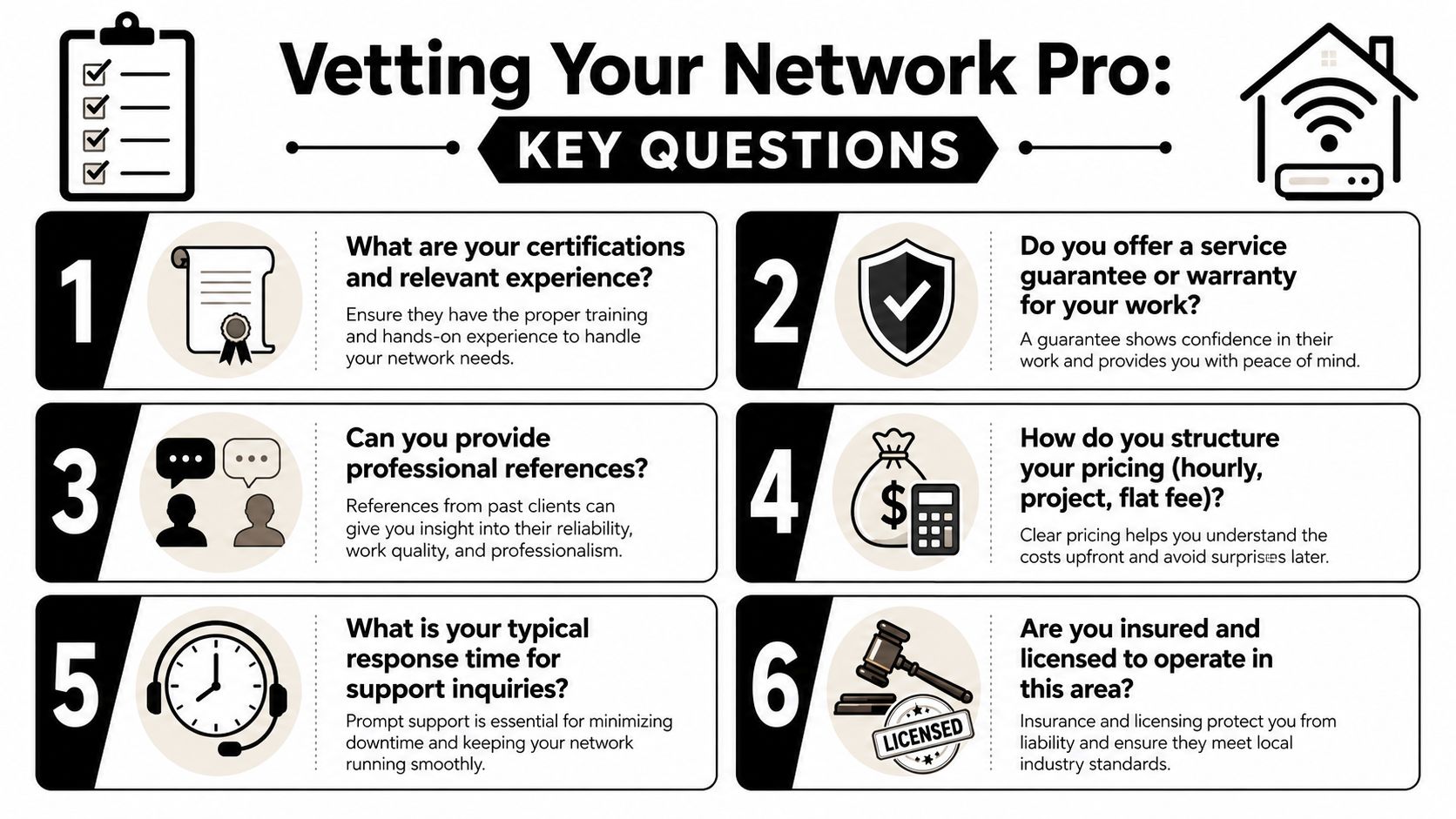
The questions that expose real competence
Ask these directly and listen for plain answers.
- What properties like mine have you worked on? A vendor who mainly handles offices may not be strong in finished homes, retrofits, or tenant-occupied units.
- What's your wiring plan? You want to hear where cables will run, where the network gear will live, and how future additions can be handled.
- Who performs the work? Some firms sell with a senior tech and install with a subcontractor or junior crew.
- What equipment do you recommend and why? Good answers connect the hardware to the property layout and use case.
- What documentation do I receive at the end? You want labels, login handoff, equipment list, and a basic network map.
- How do support calls work after install? This matters if a camera drops, a tenant changes a setting, or a router needs replacement later.
The landlord-specific questions most owners forget
If this is a rental or mixed-use property, ask about occupied-unit protocol.
| Question | Why it matters |
|---|---|
| Have you worked in tenant-occupied homes? | Access and communication are different from owner-occupied jobs |
| How do you protect walls, floors, and furnishings? | You want fewer claims and fewer headaches |
| Can you schedule around notice requirements? | Important for legal access and tenant relations |
| Will you coordinate with property management if needed? | Prevents side conversations and missed appointments |
This is also where vendor onboarding standards help. If you use a formal process similar to a property management vendor application, it becomes easier to compare providers consistently and keep records on file.
What good answers sound like
A capable provider usually speaks in sequences. First they inspect. Then they propose. Then they install. Then they verify. They'll mention labeling, testing, central equipment placement, and future expansion without being prompted much.
A risky provider leans on shortcuts. They'll say things like “we'll just add a booster” or “mesh fixes everything.” Sometimes that's true. Often it's a sign they're prescribing before diagnosing.
Hiring standard: If the provider can't explain the difference between better Wi-Fi, better cabling, and better equipment placement, don't hire them to design the whole system.
Compare bids by scope, not by total
When bids arrive, don't ask only which one is cheapest. Ask which one solves the problem you identified. A quote should tell you where work happens, what hardware is included, how many drops or access points are proposed, and what finish standard to expect.
That clarity saves money later. Most bad network jobs don't fail because owners spent too little. They fail because nobody pinned down scope before the first hole was cut.
Decoding Costs and Preparing for Your Installation
Network quotes confuse people because the line items look technical even when the underlying work is straightforward. Once you know what each item means, the estimate becomes easier to judge.
What the common line items mean
A typical installation quote may include terms like these:
- Cable drop: One cable run from the central network location to a room or device location.
- Keystone jack: The wall termination where the cable ends in a room.
- Patch panel: A central panel where all room cables terminate in the equipment area.
- Termination: The labor to finish and test the cable ends properly.
- Switch: The device that connects multiple wired runs together.
- Access point: A dedicated Wi-Fi unit placed for better coverage, often ceiling or wall mounted.
None of those items are fluff if the plan calls for them. The mistake is paying for them without knowing why they're included.
Where owners underbuy and regret it
The most common cost-saving error is installing too few jacks. That usually sounds smart in the moment. Then the TV gets moved, someone starts working from home, a smart hub gets added, or a tenant wants a wired office connection.
According to this home Ethernet wiring discussion, common pitfalls include under-installing jacks and failing to reserve expansion capacity, leading to 40 percent of homeowners needing rework within two years. That's exactly the kind of avoidable second expense owners should try to prevent.
How to read value in a quote
Use this simple lens when reviewing proposals:
| Quote feature | Usually a good sign | Usually a warning sign |
|---|---|---|
| Equipment location | Centralized and planned | Vague or improvised |
| Expansion capacity | Extra room in switch or panel | No allowance for growth |
| Room coverage | Mentions key rooms and use cases | General promise of “better Wi-Fi” |
| Finish details | Labels, testing, clean terminations | No mention of documentation |
A quote that includes a patch panel and leaves room for added drops later may look pricier on paper, but it often protects the property better over time.
How to prepare the property before install day
Owners can make the job smoother by handling access in advance.
- Clear the work areas: Utility closet, attic hatch, crawlspace entry, garage wall, and media cabinet.
- Decide on the central hub location: Pick a spot with power, ventilation, and reasonable access for future service.
- List no-drill or no-cut areas: Especially in finished rentals or recently renovated rooms.
- Coordinate entry and notice: If tenants occupy the property, confirm access windows and communication in writing.
Preparation doesn't just help the installer. It reduces labor drift, avoids mid-job changes, and keeps the project from becoming a messy all-day mystery.
After the Install Network Tuning and Landlord Tips
A network install isn't finished when the technician packs up. It's finished when the coverage works, the documentation is complete, and the property owner can manage the setup without guesswork.
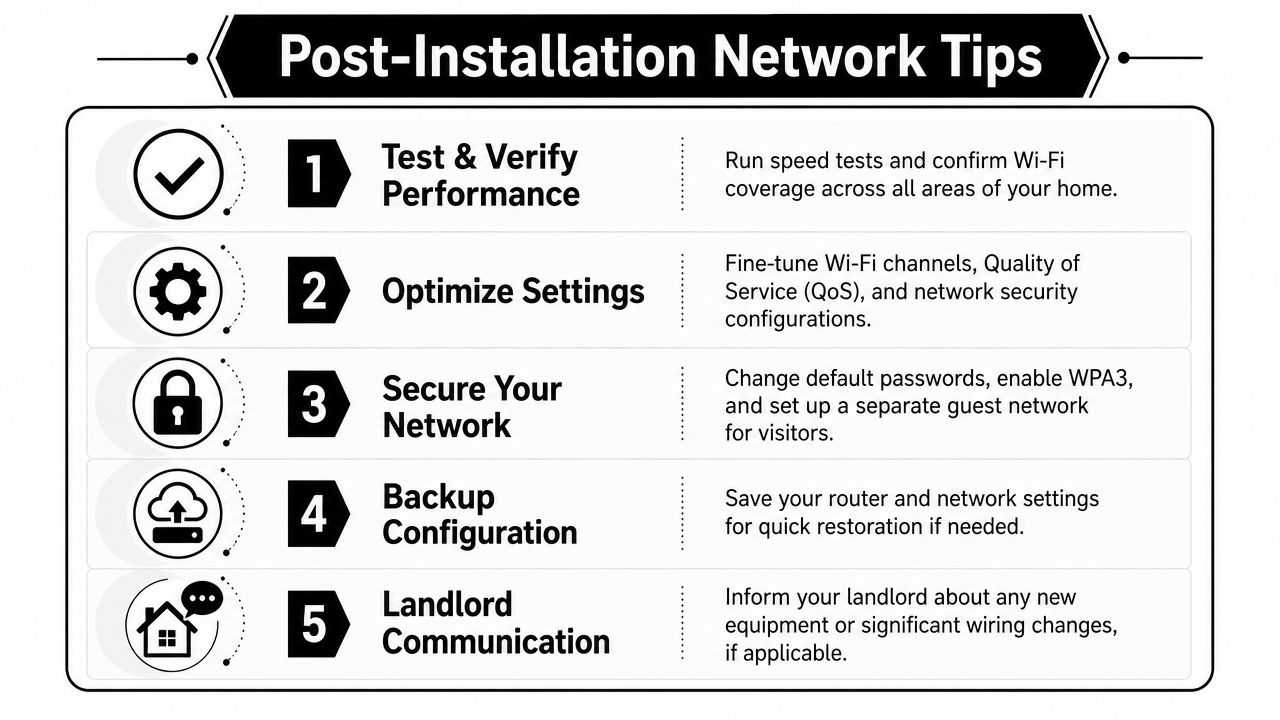
Verify the work while the installer is still available
Walk the property and test the network in the rooms that triggered the project in the first place. Don't settle for “it should be better now.” Confirm it.
Ask for these handoff items before final payment:
- Equipment list: Router, switch, access points, and any installed accessories
- Login and admin handoff: Stored securely and updated from default credentials
- Basic network map: Which room jacks and devices connect where
- Labeling standard: Wall plates, patch panel positions, and key cables
- Support instructions: Who to call, what's covered, and what counts as a billable revisit
If the provider can't leave the property with that level of clarity, the install is only half complete.
A good network handoff should let a future owner, manager, or technician understand the system without opening every wall plate and guessing.
Tune for operations, not just day one
After installation, the system often needs small adjustments. Access point placement may be right, but channel settings, guest network setup, device naming, or smart home grouping still need attention. This is especially true in rentals where occupancy patterns change.
Create a short maintenance protocol:
- Quarterly check: Confirm all access points, switches, and routers are online.
- Turnover review: Reset guest access, remove old user devices, and verify smart systems reconnect.
- Change log: Record any password changes, hardware swaps, or new wired additions.
- Service trigger list: Note what symptoms justify a callback, such as repeated camera drops or dead spots returning.
For landlords, this turns a one-time install into a manageable property system.
The legal piece most networking companies skip
Generic IT advice falls short in these scenarios. If tenants occupy the property and the network supports locks, cameras, access control, or owner-managed smart devices, access rights need to be documented properly.
In 2025, 54 percent of multi-property landlords in Fresno and Clovis reported tenants denying access to network diagnostics due to missing legal agreements, yet only 12 percent of networking service ads mentioned compliance with state realtor forms or legal updates, according to this listing-based market reference. Whether you agree with how that market snapshot was assembled or not, the practical lesson is sound: owners need written network access language before a dispute happens.
That means using a tenant network access agreement or lease language that addresses:
- Owner access for diagnostics
- Rules for installed smart devices
- What equipment belongs to the property
- Who may change passwords or settings
- How guest access is handled
- What happens at move-out
If you already think carefully about maintenance obligations, this broader guide on what repairs landlords are responsible for helps frame where connectivity-related systems can overlap with property responsibilities.
Turning the network into a rental amenity
Owners often spend money on networking defensively. They're trying to stop complaints. That's fair, but it's not the whole value.
A reliable network can support premium positioning in listings when the property has a real work-from-home office, strong whole-home coverage, smart entry, cameras, or professionally wired entertainment areas. It also helps during turnovers, inspections, and smart device troubleshooting.
The key is honesty. Don't market “enterprise Wi-Fi” or make technical claims you can't prove. Market what the property offers: wired office connection, dependable coverage in primary living areas, professionally installed access points, or smart home readiness.
That kind of language attracts better-fit tenants and reduces the gap between what's advertised and what the resident experiences.
If you own property in Fresno, Clovis, Friant, or the greater Central California region and want practical guidance that connects home systems, leasing, compliance, and long-term property value, Edinhart Realty and Property Management is a strong place to start. Their team understands that upgrades like networking don't sit in a vacuum. They affect tenant experience, maintenance coordination, legal documentation, and rental performance. Whether you need full-service management, placement support, or help preparing a home for rent or sale, they bring the operational perspective property owners need.


