

A lot of California landlords first deal with accessibility requirements in a very ordinary moment. An email comes in from a prospective renter asking whether they can add grab bars in the shower. A current tenant asks for a reserved parking space closer to the unit. An applicant says your online leasing form doesn't work with a keyboard and asks for another way to apply.
Those situations aren't edge cases. They're daily property management issues. If you own or manage rentals in California, accessibility requirements affect how you market a vacancy, respond to applicants, maintain common areas, handle paperwork, and document decisions.
Good landlords treat this as an operating standard, not a crisis response. That mindset matters because accessibility problems are easy to miss. In the digital world alone, over 96% of the world's top one million web pages are not accessible, and one reporting version found 97% of the top 1,000,000 home pages have accessibility errors, with an average of 50.8 detectable accessibility errors per home page according to WebAIM-based reporting summarized by Accessibly. If major websites miss basic requirements at that scale, landlords should assume rental operations can miss them too unless someone is checking deliberately.
Understanding Your Duty as a California Landlord
A landlord's duty starts before move-in and continues through the tenancy. It doesn't begin only when a complaint arrives.
In California, accessibility requirements sit inside a broader fair housing duty. The legal acronyms matter, but the practical point is simpler. You can't screen out people with disabilities, make rental housing harder to use through avoidable policies, or ignore requests that would let a qualified tenant use and enjoy the property.
What this looks like in real life
A prospective tenant asks whether they can install a hand-held showerhead and grab bars. Another asks for a companion to help with paperwork because of a cognitive disability. A long-term resident develops mobility limitations and now needs a parking adjustment near the building entrance.
None of those requests should trigger panic. They should trigger a process.
Professional landlords understand that accessibility work usually falls into three buckets:
- Fair access to housing: Don't advertise, screen, or communicate in a way that excludes disabled applicants.
- Fair access to the property: Keep common areas, routes, and shared facilities usable to the extent the law requires.
- Fair access to policies and services: Adjust rules and procedures when a reasonable accommodation is needed.
Practical rule: If a tenant is telling you they can't fully use the housing without a change, slow down and treat it as a fair housing issue first, not just a maintenance issue.
Why this matters beyond legal exposure
Accessibility requirements aren't just about avoiding a claim. They expand your applicant pool, reduce conflict, and create cleaner operating systems. Landlords who have a written request process, consistent documentation, and a workable vendor list usually resolve issues faster and with less friction.
California owners also need to understand that federal rules don't operate alone. Housing duties can come from the Fair Housing Act, the ADA in certain settings, and California laws that are often broader in effect. If you're unclear on where those obligations sit in the larger landlord-tenant picture, Edinhart's guide to California landlord-tenant law is a useful starting point.
The right way to think about compliance
The wrong mindset is, “What's the minimum I can get away with?”
The right mindset is, “Can this applicant or tenant use the housing and my leasing process fairly?”
That shift changes decisions. It pushes landlords to review common areas, forms, portals, house rules, and communication habits before they become a dispute.
Federal vs California Accessibility Laws Explained
California landlords get into trouble when they assume one law answers everything. It doesn't. Different laws apply to different parts of the rental relationship.
Early in the analysis, it helps to separate housing law from public accommodation law. Most residential units are governed differently than leasing offices and other public-facing areas.
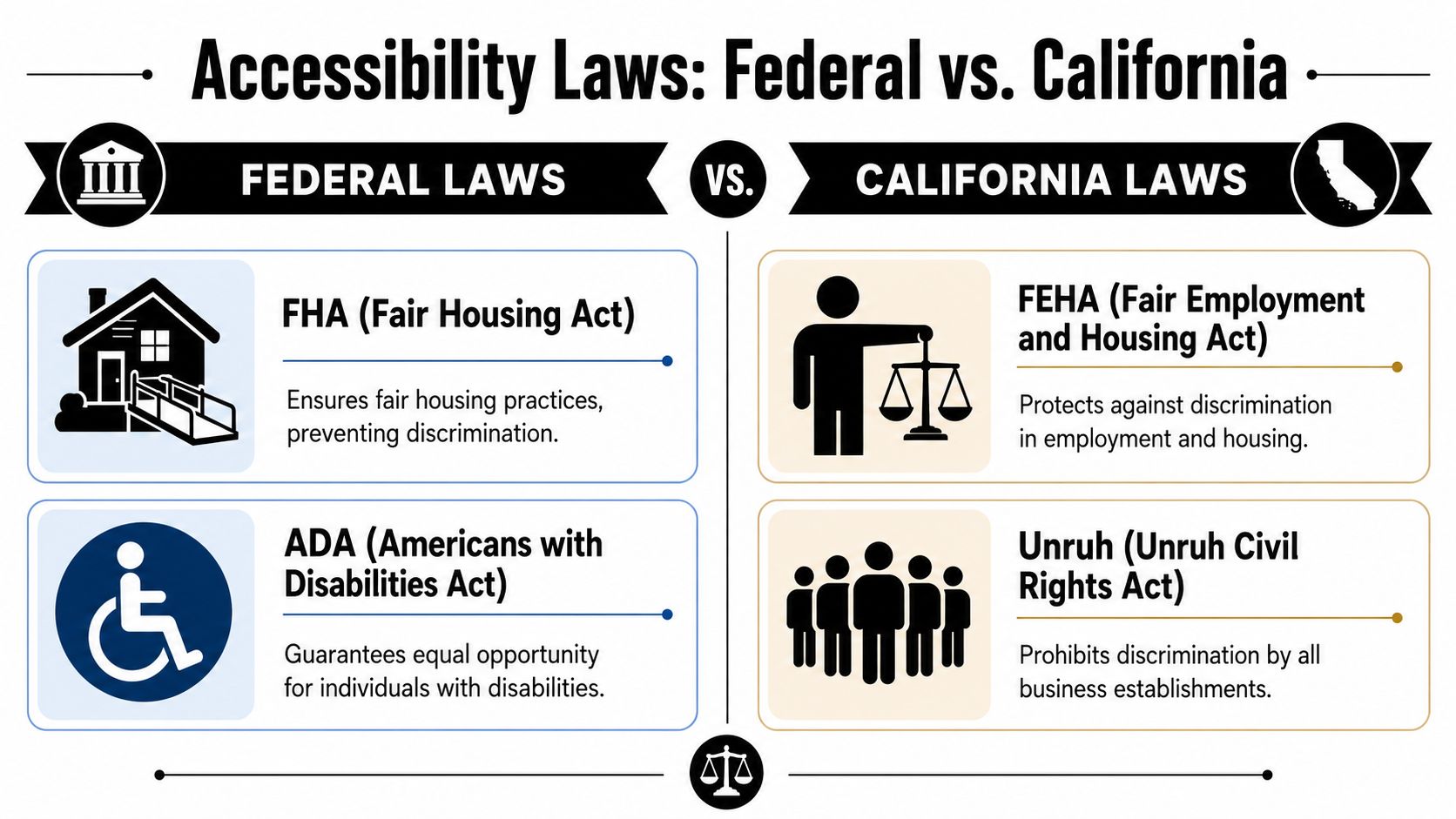
A practical comparison
| Law | Main focus for landlords | Where it usually shows up |
|---|---|---|
| FHA | Fair housing rights and disability-related accommodations or modifications | Applications, tenancy rules, unit use, requests from tenants |
| ADA | Accessibility in places of public accommodation and certain common/public-facing spaces | Leasing office, public restroom, parking serving a public office, route to public areas |
| FEHA | California fair housing protections that often require very careful handling of disability issues | Screening, policy exceptions, responses to tenant requests |
| Unruh | Broad anti-discrimination rules affecting business establishments in California | Public-facing business conduct connected to rental operations |
The cleanest operational rule is this: the dwelling unit and the rental relationship usually raise fair housing issues first, while the leasing office and public-facing facilities may raise ADA issues too.
Where landlords often confuse the laws
A common mistake is assuming the ADA governs every feature inside every rental unit. That's not usually how the analysis works. For many residential properties, the ADA is more likely to matter in places like a rental office, a public restroom, or another area open to the public.
By contrast, accommodation and modification requests by tenants are commonly analyzed through fair housing rules. In California, that means owners should handle requests carefully and consistently, because state law can be more demanding in practice than a landlord expects.
The built-environment side of accessibility shows why technical standards matter. The 2010 ADA Standards for Accessible Design include measurable thresholds. One example is that at least 60% of all public entrances in newly constructed facilities must comply with accessibility provisions under the standards published by the U.S. Access Board. That's useful for landlords because it shows accessibility law is not just a general principle. It often turns into exact design obligations.
For owners dealing with multi-story buildings or commercial-style public areas, elevator access can become part of that analysis. A practical overview of ADA elevator compliance from Crane Elevator Company helps show how those requirements get translated into specifications and maintenance decisions.
A short visual explanation helps if you prefer hearing the framework discussed out loud.
What standard should you follow
When laws overlap, landlords should usually work to the highest applicable standard in the situation at hand. That doesn't mean overbuilding every unit. It means you don't choose the weakest interpretation because it feels cheaper in the moment.
The costliest accessibility mistake is usually not the physical change. It's using the wrong legal framework and then documenting the wrong reason for saying no.
Key Triggers for Accessibility Obligations
Most landlords don't need a lecture on abstract duties. They need to know what events trigger action.
Three triggers show up repeatedly in rental operations: property design and construction, alterations to existing property, and direct requests from applicants or tenants. A fourth area now gets overlooked far too often, digital access.
Trigger one and two in the physical property
New multifamily construction brings accessibility obligations into the design phase. Existing properties can also face accessibility issues when renovations affect entrances, routes, common areas, bathrooms, counters, or other features tied to use of the property.
That means accessibility shouldn't be left to the contractor after plans are done. Owners need to ask early questions. Will a renovation change the path of travel? Will a leasing office remain usable? Will the parking layout create a new barrier? If you wait until final punch, you've already made the expensive mistakes.
Landlords should also separate ordinary repairs from work that changes usability. If a resident reports a condition that affects access, repair timing and scope matter. That's one reason it helps to understand the baseline of what repairs California landlords are responsible for, because habitability and accessibility can overlap in day-to-day operations.
Trigger three in tenant and applicant requests
The most common trigger is simple. Someone asks for help.
The request doesn't need legal language. A tenant doesn't have to say “reasonable accommodation” or cite a statute. If they say they need a rule change, parking adjustment, communication change, or physical modification because of a disability, treat that as an accessibility request and start the review process.
Landlords get into trouble when they dismiss informal requests as casual comments. Courts and agencies often care more about substance than wording. If the need is clear enough to put you on notice, respond like it matters.
Trigger four in websites and tenant portals
Digital access is now part of rental operations. Listings, photo galleries, online applications, payment portals, maintenance systems, and renewal workflows can all create barriers.
For digital content, text contrast must be at least 4.5:1, large-scale text and images of large-scale text require 3:1, prerecorded multimedia needs captions and transcripts, and website functionality must be usable through a keyboard interface according to the accessibility baseline summarized by Recite Me. For landlords, that means an applicant should be able to move through your online process without getting trapped by a mouse-only menu, unlabeled form fields, or low-contrast text.
If a prospect can see your listing but can't submit the inquiry form or application with assistive technology, your leasing pipeline isn't accessible in any meaningful sense.
What works is testing actual user flows. Start with the vacancy page, then the inquiry form, then the application, then the portal login. What doesn't work is adding an overlay widget and assuming the problem is solved.
Handling Reasonable Accommodation and Modification Requests
Landlords either build trust or create a record that hurts them later.
The first distinction matters. An accommodation is usually a change to a rule, policy, or procedure. A modification is usually a physical change to the unit or property.
Know the difference before you answer
Examples help:
- Accommodation example: A no-pets policy needs an exception so a tenant can keep a service animal or support animal when the law requires it.
- Modification example: A tenant asks to install a ramp, lower a threshold, or add grab bars.
- Hybrid situation: A reserved parking arrangement may involve both a policy decision and changes to signage or striping.
The mistake is treating every request like ordinary maintenance, or every request like the tenant is asking for a favor. It's neither. It's a legal and operational issue.
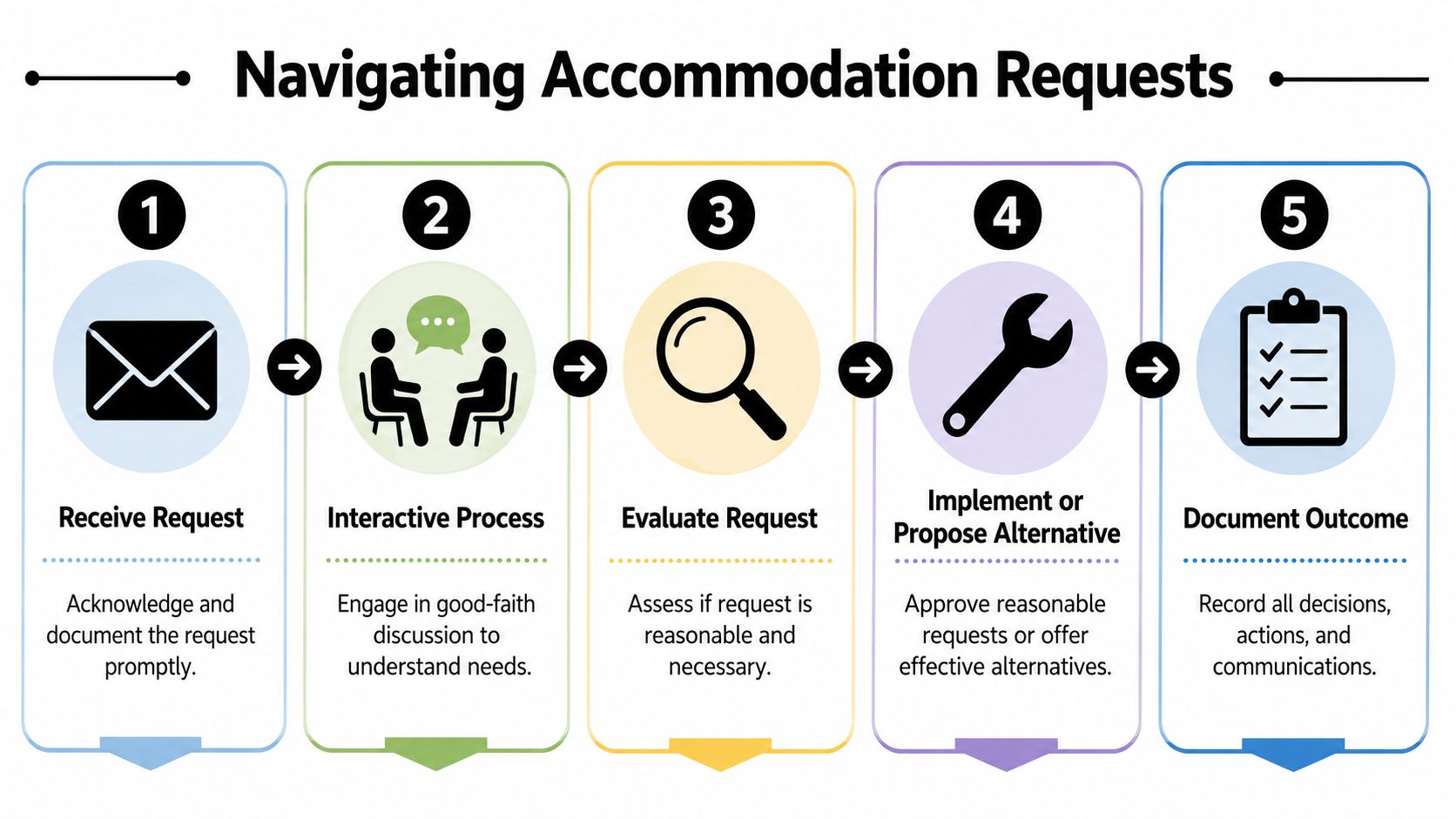
A workable response process
Use a repeatable workflow every time.
Acknowledge the request promptly
Don't let it sit in an inbox while staff debate terminology. Confirm receipt and tell the applicant or tenant you're reviewing it.Clarify the need if necessary
If the request is vague, ask limited follow-up questions focused on the connection between the disability-related need and the requested change.Enter the interactive process
This is a good-faith discussion. The goal is to understand what barrier exists and whether the requested solution is reasonable or whether another effective solution would work.Evaluate the operational impact
Consider feasibility, safety, property configuration, and whether the request changes a fundamental part of your operations. Be careful here. “Inconvenient” is not the same as unreasonable.Respond in writing and document the result
Approve, deny with a lawful reason, or propose an effective alternative. Then preserve the file.
Manager's rule: Never deny a request verbally and move on. If the issue matters enough to deny, it matters enough to document carefully.
What landlords can and can't do
A landlord may sometimes seek reliable information when a disability-related need isn't obvious. But the request for information must stay narrow. Don't ask for a full medical file. Don't ask for a diagnosis if it isn't needed to evaluate the request. Don't demand details that go beyond necessity.
On cost, accommodations and modifications are handled differently in many situations. Policy changes are often absorbed as part of operations. Physical changes may raise cost allocation questions depending on the circumstances, the property type, and the governing law. That's why landlords should avoid blanket statements like “tenants always pay” or “owners always pay.” They don't hold up well across real cases.
What works is a written request form, staff training, response deadlines, and a contractor list for common modification work. What doesn't work is improvising every request from scratch.
Your Essential Accessibility Compliance Checklist
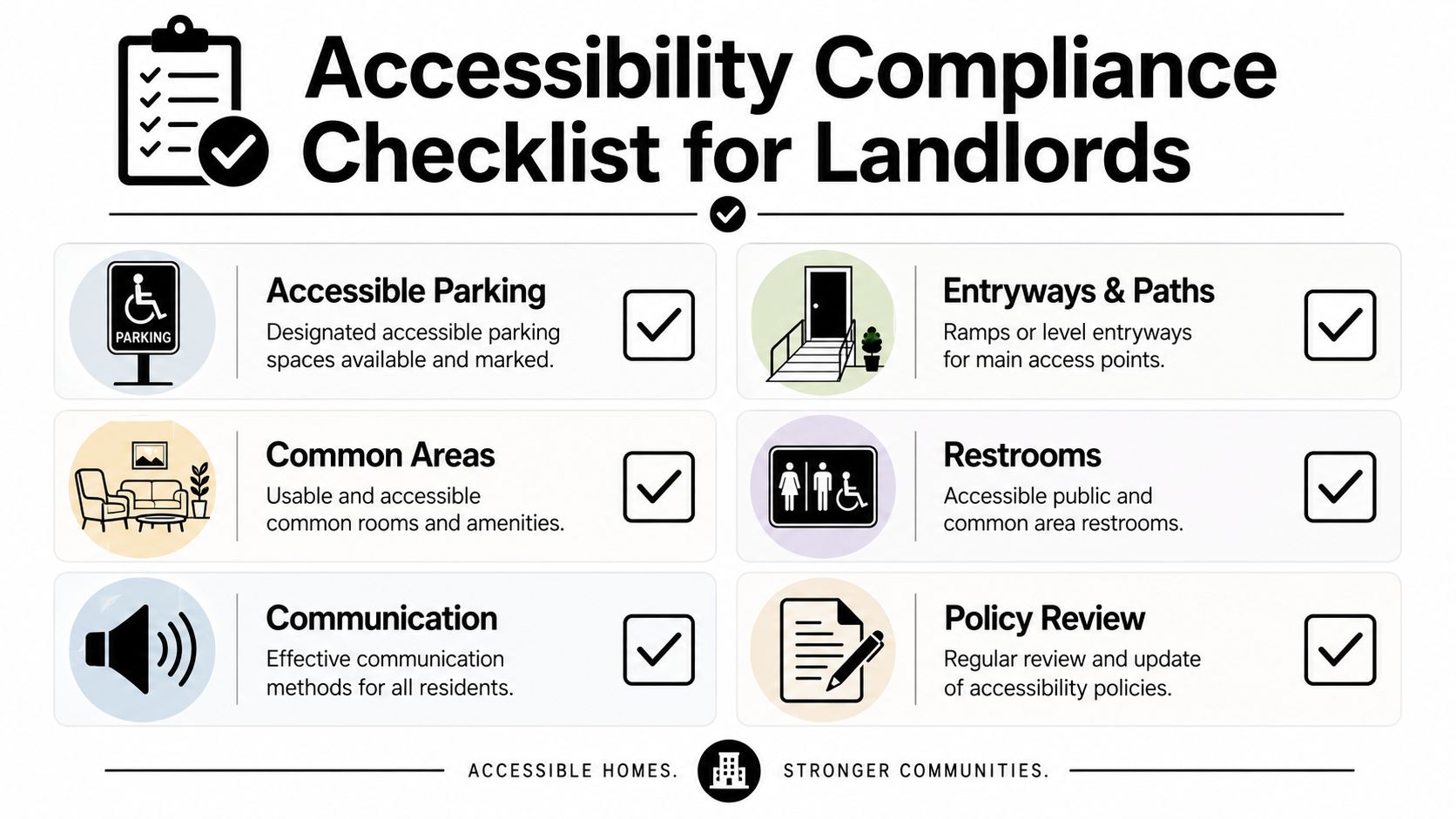
Most landlords don't need a giant binder. They need a field checklist that catches common failures before a tenant points them out.
Use this during turnover, annual reviews, and any renovation planning. The goal isn't to certify every property on your own. The goal is to spot obvious barriers, tighten your process, and know when to call in a specialist.
Before a tenancy starts
- Marketing access: Check that prospects can inquire, request a showing, and apply without hitting avoidable barriers in your phone, email, and online process.
- Leasing office access: Review parking, route, entry door, counters, and seating if you meet applicants in person.
- Written policy: Keep a clear internal procedure for handling accommodation and modification requests.
During occupancy
- Entry route: Look at the path from parking or drop-off to the unit and common areas. Uneven surfaces, abrupt level changes, and heavy gates create more problems than owners expect.
- Doors and hardware: Test whether doors, latches, and handles are operable without excessive force or awkward grip requirements.
- Common areas: Laundry rooms, mail areas, clubhouses, and shared restrooms deserve regular review because that's where many disputes begin.
- Communication method: Be ready to communicate by email, phone relay, written notice, or another effective method based on the resident's need.
During repairs and upgrades
Use maintenance and remodeling as your chance to remove barriers instead of rebuilding them.
For example, bathroom work often becomes the point where owners realize layout matters. Even if you're reviewing a non-California resource for planning concepts, a dimensional guide like ADA bathroom standards for Michigan homes can help owners ask better questions before approving fixture placement, clearances, or door swings. The legal standard for your property still needs California-specific review, but practical references help you avoid bad design assumptions.
Policy self-audit
Ask these questions at least once a year:
| Question | Why it matters |
|---|---|
| Do staff know how to recognize a disability-related request? | A missed request is often the first avoidable error |
| Are denials reviewed by someone senior before sending? | Fast denials often create bad records |
| Are vendors reintroducing barriers during routine work? | New paint, counters, doors, and web tools can undo prior fixes |
A checklist won't replace legal advice or expert inspection. It will stop many preventable mistakes.
Planning for Accessibility Costs and Timelines
Owners usually ask two questions first. What will this cost, and who pays?
The answer depends on the kind of request, the property, and the work involved. But the biggest budgeting mistake isn't spending too much. It's failing to plan at all.
Budget by category, not by panic
Accessibility costs tend to fall into a few operational buckets:
- Policy and process costs: Staff training, forms, review procedures, and documentation systems.
- Digital access costs: Fixes to application flows, portals, PDFs, notices, and leasing content.
- Physical work costs: Signage, hardware, route adjustments, parking changes, bathroom updates, ramps, or other construction items.
- Professional review costs: Inspectors, accessibility consultants, fair housing counsel, and qualified contractors.
That framework helps owners stop treating every request like an emergency capital project. Many issues are low-cost process changes. Others are construction issues that should be planned into maintenance and turnover cycles.
How to prioritize when the budget is tight
The best triage method is practical. Inventory digital assets, identify critical gaps, and prioritize fixes based on service impact and risk rather than trying to fix everything at once, as recommended in Vispero's accessibility readiness guidance. That same sequencing works for physical property operations.
Start with barriers that block basic housing functions. Entry access, parking access, communication access, application access, and payment or maintenance workflows usually deserve attention before cosmetic items. Then move to recurring pain points in common areas and vendor-controlled systems.
The smartest accessibility budget is usually the one tied to turnover schedules, reserve planning, and recurring inspections. That keeps you from making rushed decisions after a complaint arrives.
What doesn't work
Two habits create expensive outcomes.
First, landlords postpone review because they assume all accessibility work means major construction. Often it doesn't. Sometimes the immediate fix is a policy change, alternate communication method, or a targeted repair.
Second, owners rely on one-time corrections. Accessibility is not a one-and-done project. New websites, new staff, new vendors, and routine renovations can all recreate the same barrier you solved last year.
Inspections Documentation and Expert Help in Fresno
If a landlord asks me what protects them day to day, the answer is documentation backed by routine inspection.
Accessibility disputes often turn on timing, communication, and follow-through. Did you recognize the request? Did you ask for only the information you were entitled to seek? Did you respond promptly? Did you consider alternatives? If your file is thin, your position usually is too.
Build accessibility into inspections and records
A standard inspection process should include accessibility observations where relevant. That doesn't mean every walkthrough becomes a technical certification. It means your inspection habits should catch obvious problems in routes, doors, parking, lighting, signage, common spaces, and wear conditions that affect usable access.
Keep a file for each issue that includes:
- Request records: Email, text, portal message, letter, or notes of a phone call
- Review notes: What was requested, what follow-up was made, and what alternatives were discussed
- Work records: Bids, work orders, invoices, contractor photos, and completion notes
- Final communication: Approval, denial, partial approval, or implementation summary
For owners already using formal inspection workflows, a structured template helps keep the record consistent. Edinhart's property inspection report template is the kind of tool that can support cleaner property files when accessibility issues intersect with condition reporting.
Why expert support matters
Landlords in Fresno and the surrounding Central California market often need help in three places at once: fair housing response, contractor coordination, and digital leasing access. Digital access matters because the Department of Justice's rule for government entities formally names WCAG 2.1 Level AA as the standard for web content and mobile apps in that setting, and professional property managers commonly use that same benchmark for portals and web content as a practical best practice according to the Department of Justice web accessibility rule.
That matters for leasing because inaccessible portals, applications, and notices can undermine otherwise solid property operations.
For owners who don't want to run all of this internally, Edinhart Realty and Property Management is one local option that handles leasing operations, tenant communication, inspections, and documentation using standardized workflows and C.A.R. forms. That doesn't replace legal advice or specialist accessibility review when needed, but it does give owners a more organized process than scattered emails and verbal approvals.
The bottom line for landlords
Accessibility requirements are easiest to manage when they become routine. Review before marketing. Respond carefully during tenancy. Inspect and document after every request and every relevant repair.
That approach is how landlords reduce risk and serve tenants fairly at the same time.
If you own rental property in Fresno, Clovis, Friant, or the surrounding area and want help building cleaner leasing, inspection, and documentation systems around accessibility requirements, contact Edinhart Realty and Property Management. They can help owners manage day-to-day rental operations with structured processes that support fair housing compliance, tenant communication, and property oversight.


